Feature
Share properties on WhatsApp
How do I share a property with a buyer on WhatsApp?
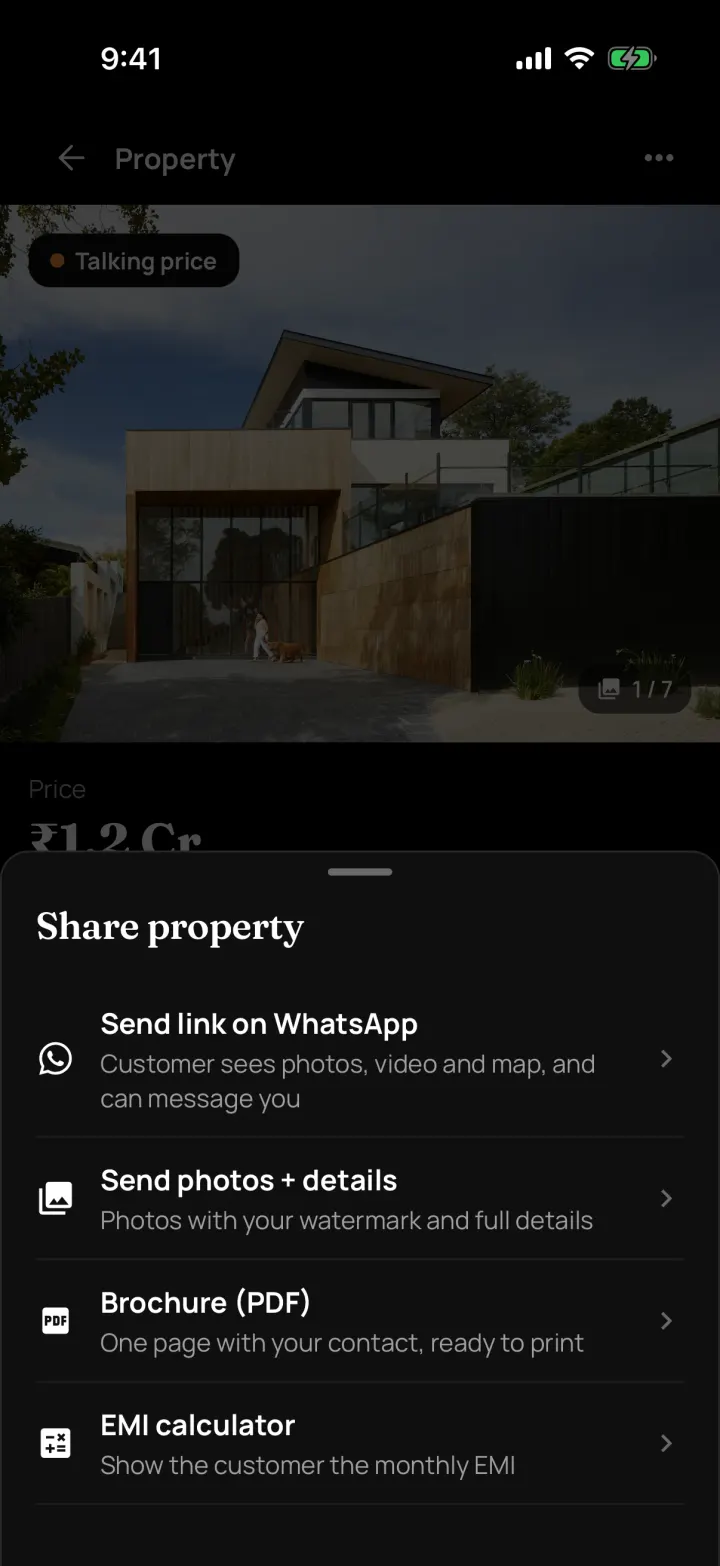
Open the property and tap Share. Send a link to a property page, send the photos with details, or send a one-page PDF brochure. Buyers never see the owner's details.
The problem it solves
Forwarding photos one by one takes ages, and sometimes they're of the wrong flat.
What you get
- Property page link with photos, video, map and EMI. Buyers can send an enquiry without signing up
- Enquiries from the link come into the app as new customers
- Photos + details, with your watermark on the photos
- Brochure (PDF) with your agency's contact, ready to print or send
How to do it in the app
Step 1
Open the property and tap Share
The Share property sheet gives you four choices.
Step 2
Send link on WhatsApp
The buyer gets a page with photos, video, map and EMI. They can send you an enquiry without signing up.
Step 3
Or send photos + details
All the photos go with your watermark and the full details.
Step 4
Or send a brochure (PDF)
One page with your agency's contact, ready to print or forward.
FAQ
Frequently asked questions
Common questions about share properties on whatsapp in DreamToBuy.
No. The property page and brochure never show the owner's name or number.
The enquiry comes into your app as a new customer, so you can call them back.
No. Sharing uses your own WhatsApp, so there are no per-message charges.
See it on your own customers and properties
Get a free demo of DreamToBuy. We'll set up your agency and walk your team through the app.