Feature
Call and WhatsApp in one tap
Can I call or WhatsApp a customer from the app?
Yes. Tap Call or WhatsApp on any customer. After a call, the app asks what happened and can set the next reminder for you.
The problem it solves
After a busy day you can't remember who you called or what they said.
What you get
- Uses your phone's normal dialer and your own WhatsApp
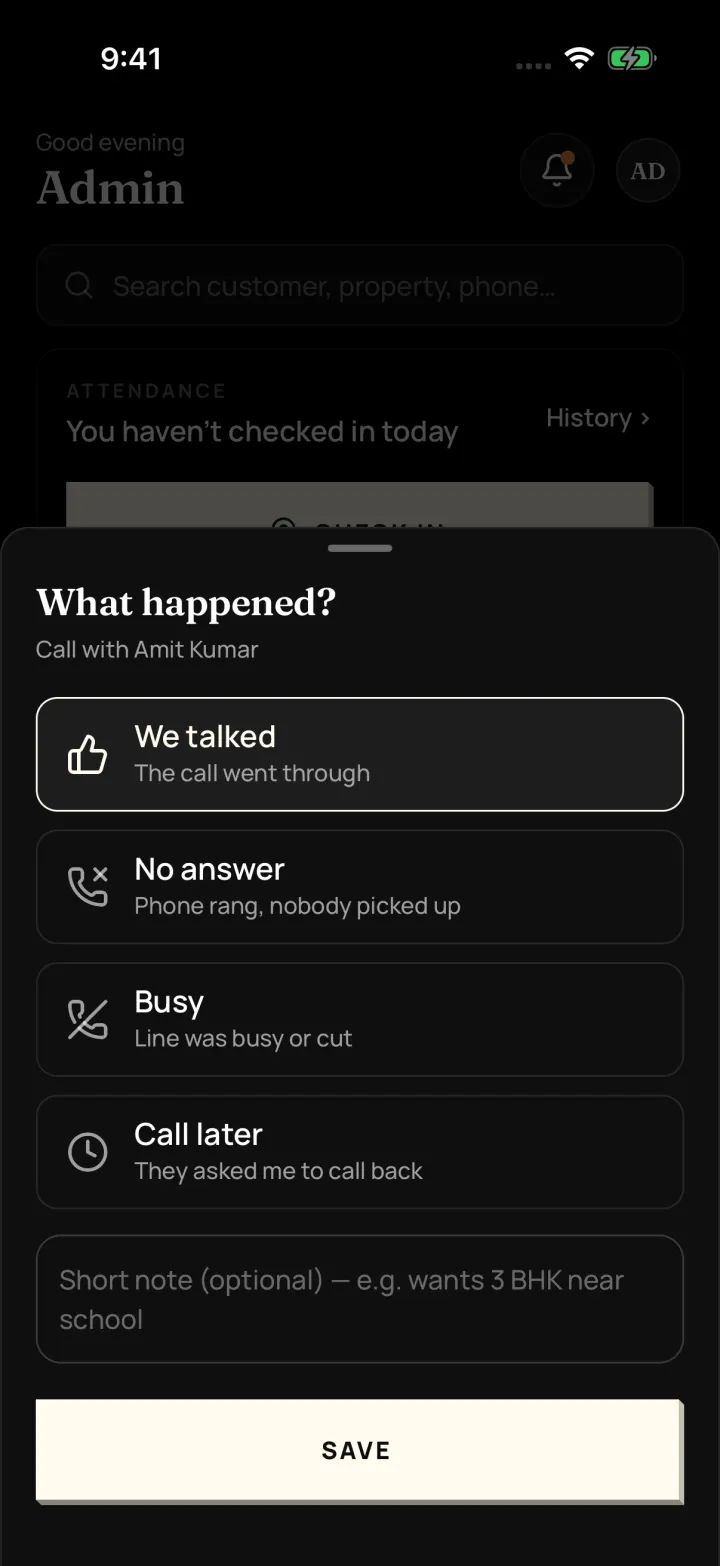
- After the call: We talked, No answer, Busy or Call later, with a short note
- Ready messages fill in the customer's name, property and link for you
- Every call and message is saved in the customer's history
How to do it in the app
Step 1
Tap Call
Your phone's normal dialer opens. The app doesn't record calls.
Step 2
Note what happened
When you come back, the app asks "What happened?": We talked, No answer, Busy or Call later. Add a short note if you like.
Step 3
Set the next reminder
Tap "Save & set reminder" and pick a quick time like Today 5 PM.
Step 4
Or send a WhatsApp
Tap WhatsApp, pick a ready message, check it and tap "Open WhatsApp". It opens in your own WhatsApp.
FAQ
Frequently asked questions
Common questions about call and whatsapp in one tap in DreamToBuy.
No. It uses your phone's normal dialer and only saves what you note after the call.
No. Messages open in your own WhatsApp one customer at a time, so there are no per-message charges.
Saved message templates that fill in the customer's name, the property, the link, your name and the date, so you don't type the same message again.
See it on your own customers and properties
Get a free demo of DreamToBuy. We'll set up your agency and walk your team through the app.