Feature
Today screen
What does the app show when I open it?
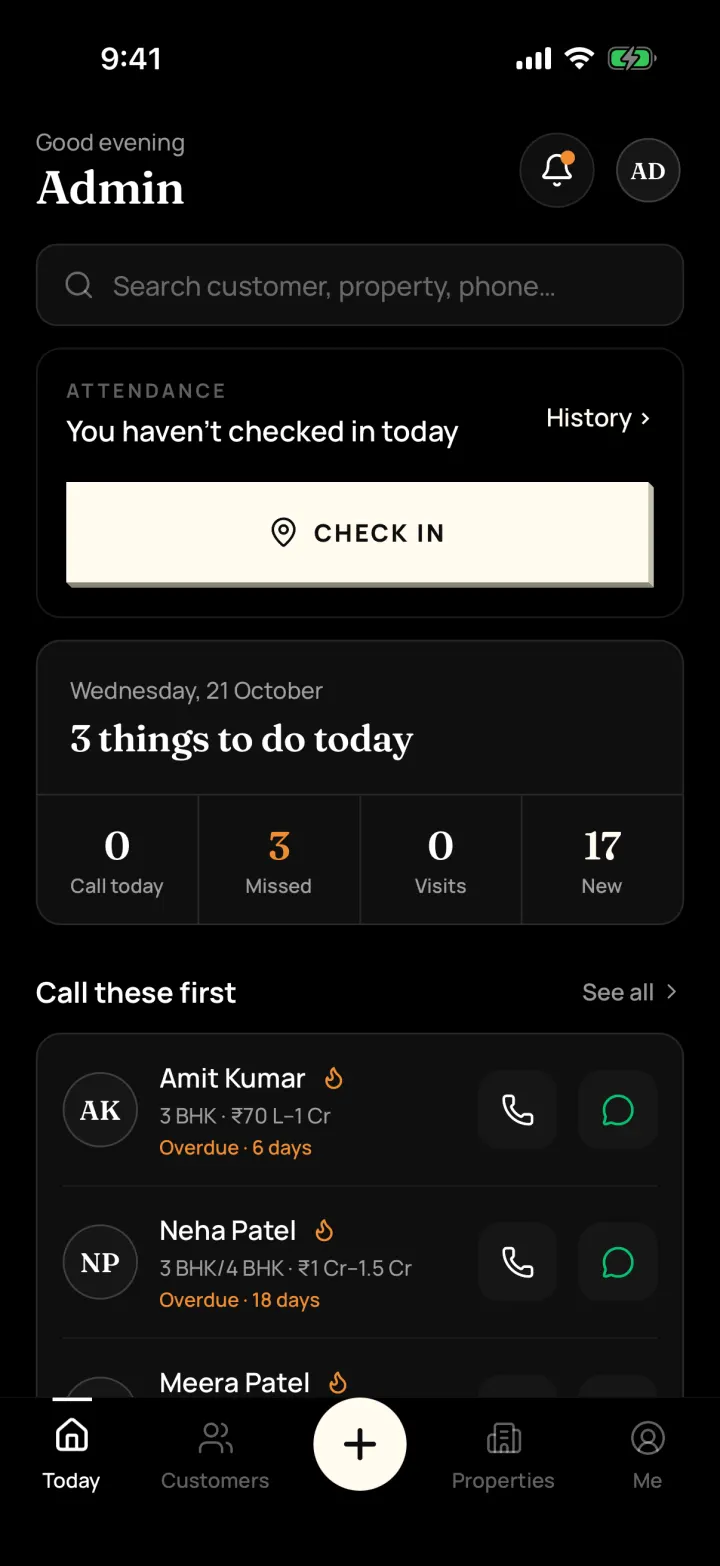
A short list of what to do today: who to call, missed call-backs, today's site visits and new customers. Tap any number to see the names.
The problem it solves
You start the day not sure who to call first, and some call-backs get forgotten.
What you get
- "Things to do today" with Call today, Missed, Visits and New
- "Call these first": your hot customers with one-tap Call and WhatsApp
- Search any customer, property or phone number from the top
- Owners and managers also see team numbers for the week and month
How to do it in the app
Step 1
Open the app
The Today tab opens first, with a greeting and a search bar for any customer, property or phone number.
Step 2
Check your numbers
"Things to do today" shows Call today, Missed, Visits and New. Tap a number to see the names behind it.
Step 3
Call these first
Your hot customers are listed with Call and WhatsApp buttons, so you can start with the people most likely to buy.
Step 4
Check in
If your company uses attendance, tap Check in when you start work.
FAQ
Frequently asked questions
Common questions about today screen in DreamToBuy.
They are reminders whose time has passed without being marked done. They stay on your Today screen until you call back or mark them done.
Yes. Owners and managers also see team numbers such as active customers, visits this week and deals this month.
See it on your own customers and properties
Get a free demo of DreamToBuy. We'll set up your agency and walk your team through the app.