Customers: buyers and owners
How do I keep track of buyers and owners?
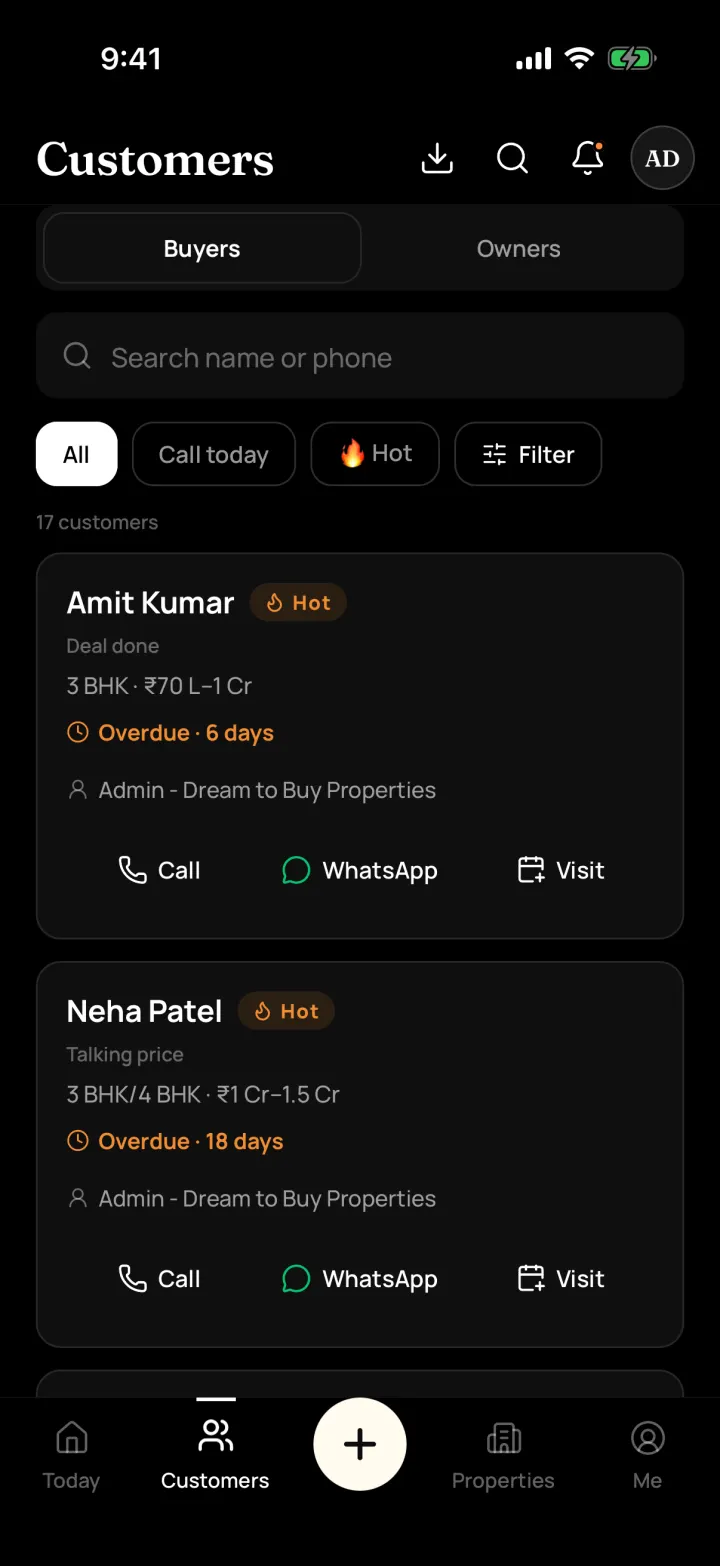
Save every buyer and property owner with what they want, their budget and where they came from. Mark each one Hot, Warm or Cold so you know who is serious.
The problem it solves
Numbers and requirements are spread across a diary, Excel and WhatsApp chats.
What you get
- Buyers and Owners in two simple lists; one person can be both
- Hot / Warm / Cold, and steps like Talked, Site visit, Talking price and Deal done
- Note where they came from: walk-in, referral, 99acres, MagicBricks, Facebook and more
- The app warns you if the phone number is already saved
How to do it in the app
Add a customer
Tap + and Add customer. Choose "Wants a property", "Has a property" or both, then add the name and phone number.
Note what they want
Add budget, BHK, preferred areas and must-haves. Note where they came from, such as walk-in, referral, 99acres or Facebook.
Mark Hot, Warm or Cold
Use the tag so you and your team know who is serious.
Move them along
Change the step as things progress: Talked, Interested, Site visit, Talking price, Deal done, or Not interested with a reason.
Frequently asked questions
Common questions about customers: buyers and owners in DreamToBuy.
See it on your own customers and properties
Get a free demo of DreamToBuy. We'll set up your agency and walk your team through the app.