Feature
Reminders and call-backs
Will the app remind me to call customers back?
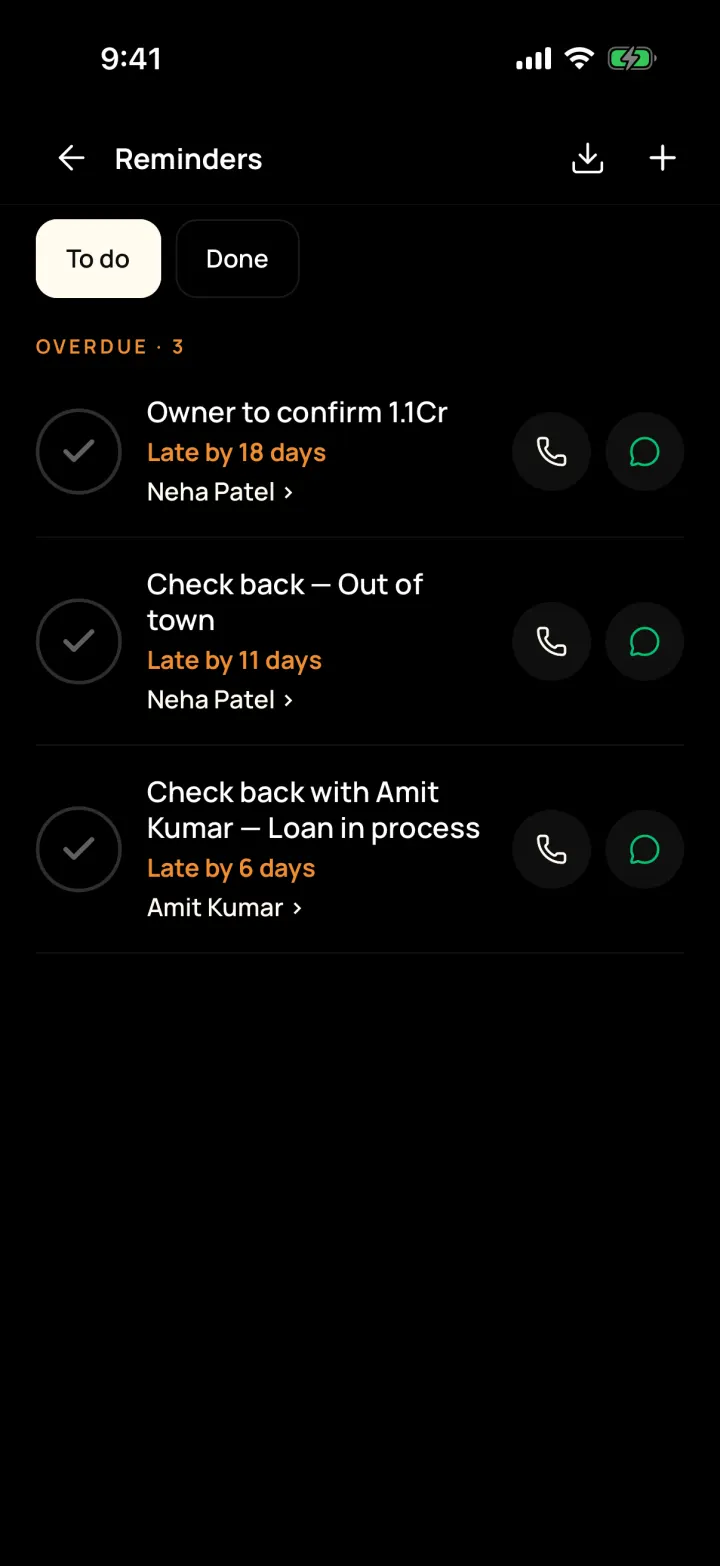
Yes. Set a reminder in two taps and your phone alerts you when it's due. Missed ones stay at the top until you finish them.
The problem it solves
A buyer asked you to call back on Friday, you forgot, and they bought through someone else.
What you get
- Overdue, Today and Later lists, with Call, WhatsApp and Mark done
- Reminder types: call, meeting, documents and payment
- Phone notifications for reminders, visits and new hot customers
How to do it in the app
Step 1
Tap + then Set reminder
Choose "Which customer?" and pick a time. You can also set one right after a call.
Step 2
Get an alert
Your phone shows a notification when the reminder is due.
Step 3
Call or WhatsApp from the list
Me → Reminders shows overdue ones first, each with Call and WhatsApp buttons.
Step 4
Mark it done
Tick it off when finished, or change the time if the customer asked you to call later.
FAQ
Frequently asked questions
Common questions about reminders and call-backs in DreamToBuy.
Reminder, call, meeting, documents and payment.
It shows as overdue, with how many days late, on your Today screen and in Reminders until you mark it done.
See it on your own customers and properties
Get a free demo of DreamToBuy. We'll set up your agency and walk your team through the app.