Feature
Site visits
How do I plan and track site visits?
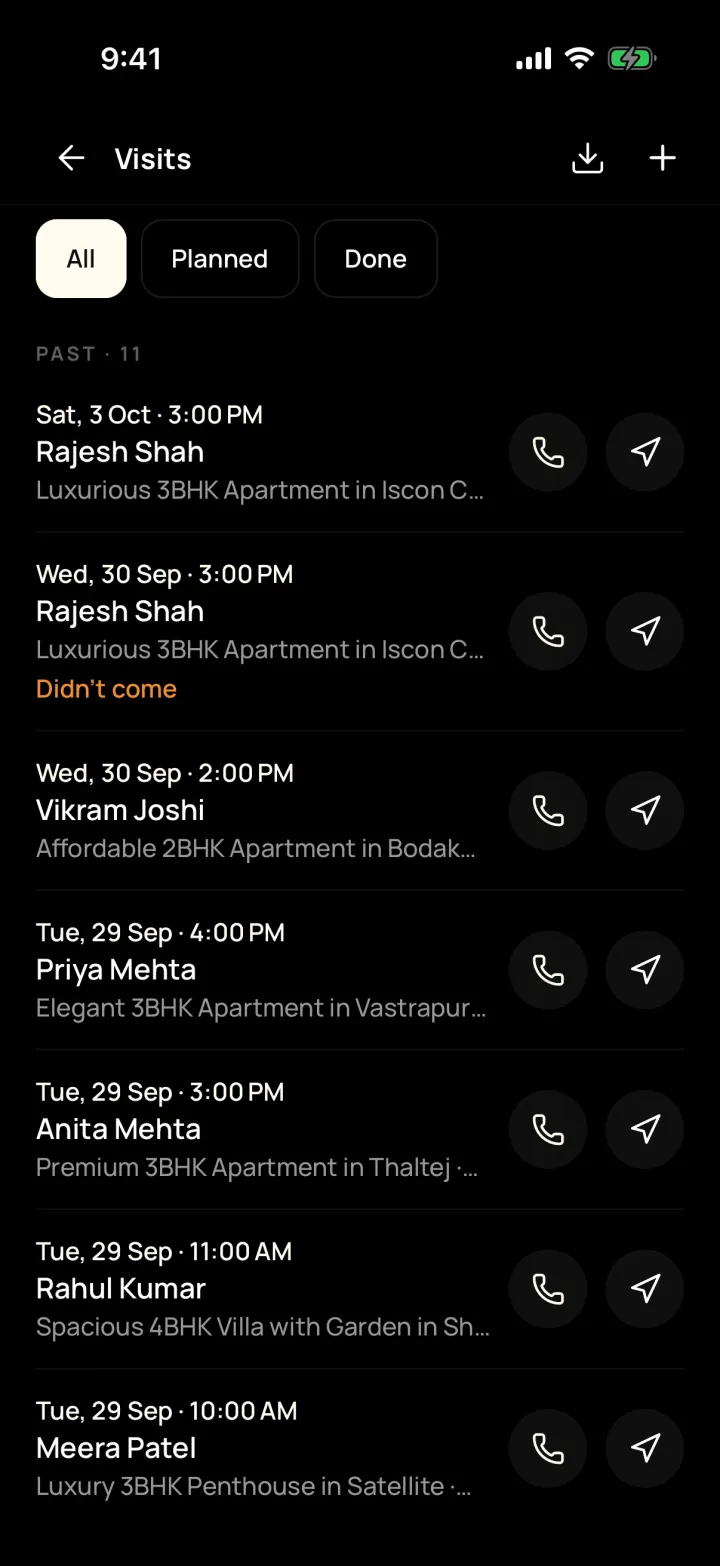
Book a visit for a customer and property, give it to a team member and get reminded before it starts. Afterwards, note if the buyer liked it.
The problem it solves
Visits are planned on calls and in memory, and nobody knows what the buyer thought.
What you get
- All, Planned and Done lists, with Call and Directions on every visit
- Mark done, "Customer didn't come" or "Visit cancelled" with a reason
- Record interested, maybe or not interested for each property shown
How to do it in the app
Step 1
Tap + then Schedule visit
Pick the customer, the property, the date and the time.
Step 2
Get there
Open Visits to call the customer or get directions to the property.
Step 3
Record what happened
Mark it done, or choose "Customer didn't come" or "Visit cancelled" with a reason.
Step 4
Note their feedback
Record whether they liked the property, said maybe or didn't like it.
FAQ
Frequently asked questions
Common questions about site visits in DreamToBuy.
Yes. Owners and managers can assign customers and their visits to a team member.
Yes. The Visits list has All, Planned and Done, with date, customer and property for each one.
See it on your own customers and properties
Get a free demo of DreamToBuy. We'll set up your agency and walk your team through the app.